
Getting Started
Welcome to the Doitpay Merchant Dashboard. Learn how to log in, navigate, and manage your payment operations.
Welcome to the Doitpay Merchant Dashboard. This guide will help you log in, navigate the dashboard, and understand the key features available to manage your payment operations.

Logging In
- Open your web browser and go to your dashboard URL
- Enter your Email Address
- Enter your Password
- Complete the Verify you are human checkbox if prompted
- Click Login
Tip
Bookmark the dashboard URL for quick access. If you forget your password, click Forgot password? on the login page to reset it.

First-Time Setup
After your first login, we recommend completing these steps:
- Enable Two-Factor Authentication (2FA): You will see a "2FA not enabled" warning in the top navigation. Click it to set up additional security for your account.
- Familiarize yourself with the dashboard: Spend a few minutes exploring each section.
Understanding the Navigation
The sidebar menu is organized into four main sections:
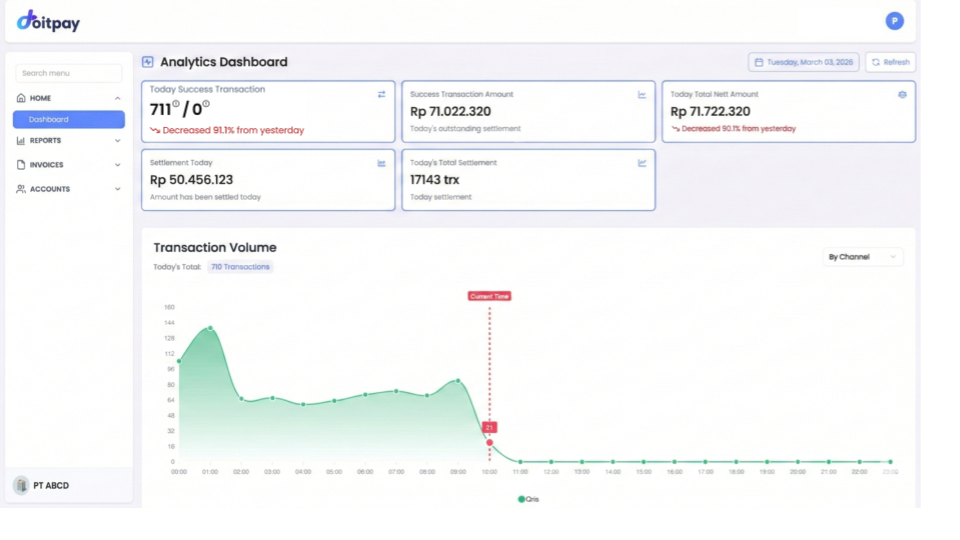
HOME
Your starting point with the Analytics Dashboard showing real-time transaction metrics and business performance.
REPORTS
Detailed transaction reports organized by payment channel:
- Transaction: Overview of all transactions
- Virtual Account: Bank transfer payments via VA
- QRIS Payment: QR code payments
- Disbursement: Outgoing fund transfers
- E-Wallet: Digital wallet payments (OVO, GoPay, DANA, etc.)
- Credit Card: Card-based payments
- Settlement: Fund settlement to your bank
- Cash Flow: Complete ledger of fund movements
- Portal Download: Bulk report downloads
INVOICES
Tools for collecting payments from customers:
- Payment Link: Create shareable payment URLs
- Deposit VA: Top up your disbursement balance
ACCOUNTS
Manage your business structure:
- Account Group: View your organization overview
- Merchant: Manage individual merchant accounts
- Profile & Settings: Manage your profile, business info, branding, and notifications
Quick Navigation Tips
- Search Menu: Use the search field at the top of the sidebar to quickly find any feature
- Expand/Collapse: Click section headers (HOME, REPORTS, etc.) to show or hide submenus
- Current Location: The active page is highlighted in the sidebar
Common First Tasks
| What you want to do | Where to go |
|---|---|
| Check today's sales | HOME > Dashboard |
| View recent transactions | REPORTS > Transaction |
| Create an invoice for a customer | INVOICES > Payment Link |
| Download transaction data | REPORTS > (select channel) > CSV button |
| Add funds for disbursement | INVOICES > Deposit VA |
Getting Help
If you encounter issues or have questions:
- Contact your account manager
- Reach out to the Doitpay support team via the provided channels