
Deposit VA (Pre-Fund)
Add funds to your Doitpay disbursement balance via Virtual Account or manual bank transfer.
Deposit VA allows you to top up your Doitpay disbursement balance. Funds added here are for disbursement purposes only and cannot be used to accept payments from customers.
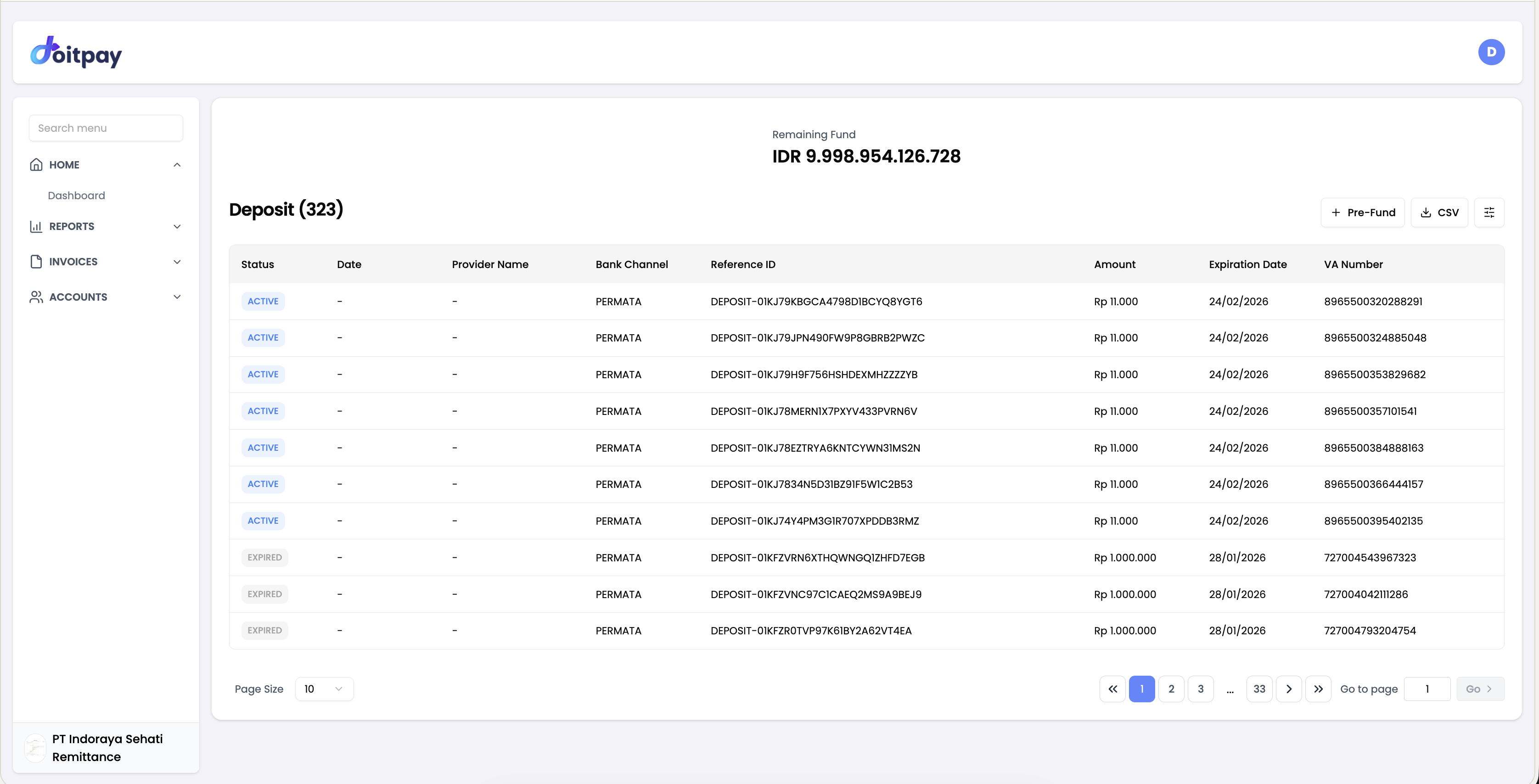
Accessing Deposit VA
Navigate to INVOICES > Deposit VA from the sidebar.
Available Top-Up Methods
There are two ways to top up your disbursement balance:
| Method | Limit | Settlement Time |
|---|---|---|
| Virtual Account (VA) | IDR 25,000,000 per transaction | H+2 after successful payment |
| Manual Bank Transfer | No per-transaction limit | Up to 24 working hours after confirmation |
Method 1: Virtual Account (VA)
The VA method generates a dedicated account number for you to transfer to. It is the fastest self-service option.
Creating a VA Deposit
- Click the Pre-Fund button
- Select your preferred Bank Channel
- Enter the Amount you want to deposit
- Click Create or Submit
- Note the generated VA Number and Expiration Date
- Transfer the exact amount to the VA Number from your bank (ATM, internet banking, or mobile banking)
Important
Transfer the exact amount specified. Different amounts may not be processed automatically. Complete transfers before the VA expires.
Understanding the Deposit Table
| Column | Description |
|---|---|
| Status | Current state of the deposit |
| Date | When the deposit was created |
| Provider Name | Payment provider processing the deposit |
| Bank Channel | Which bank the VA is with |
| Reference ID | Tracking reference |
| Amount | Deposit amount |
| Expiration Date | When the VA expires |
| VA Number | The Virtual Account number to transfer to |
Deposit Status
| Status | Meaning | What to do |
|---|---|---|
| Active | Waiting for your bank transfer | Transfer to the VA before expiration |
| Success | Funds received and credited | Nothing, your balance is updated |
| Expired | VA expired without payment | Create a new deposit request |
Method 2: Manual Bank Transfer
For amounts exceeding the VA limit or when you prefer direct bank transfers, you can transfer manually to one of the three available bank accounts below.
Required: Include Your Disbursement Source Account
You must include your unique Disbursement Source Account code in the transfer description/remarks. Without it, your deposit cannot be matched to your account.
How to find it:
- Click your profile icon in the top-right navigation
- Select API Settings
- Copy your Disbursement Source Account by clicking the copy icon
- Paste it as the transfer description when making your bank transfer
Available Banks
Bank Mandiri
| Field | Details |
|---|---|
| Bank Name | Bank Mandiri |
| Branch | KCP Jakarta Berdharma |
| Account Holder | INDORAYA SEHATI REMITTANCE |
| Account Number | 1220080448445 |
Bank Artha Graha
| Field | Details |
|---|---|
| Bank Name | Bank Artha Graha |
| Account Number | 1083123730 |
Bank Danamon
| Field | Details |
|---|---|
| Bank Name | Bank Danamon |
| Account Holder | PT INDORAYA SEHATI REMITTANCE |
| Account Number | 003695398127 |
Steps for Manual Bank Transfer
- Transfer funds to one of the bank accounts above
- Enter your Disbursement Source Account code as the transfer description/remarks
- Email fat@doitpay.co with your transfer receipt to confirm the top-up
- Funds will reflect in your disbursement balance within 24 working hours after verification
Checking Your Manual Transfer Status
- Go to INVOICES > Deposit VA
- Check if the deposit appears in the table
- For manual transfers, contact fat@doitpay.co to confirm your transfer status
Exporting Deposit History
Click the CSV button to download your deposit history for accounting records.
Common Questions
Q: What is the VA top-up transaction limit?
The limit is IDR 25,000,000 per transaction. For larger amounts, use the manual bank transfer method or perform multiple VA transactions.
Q: Can I use my top-up balance to accept customer payments?
No. The disbursement balance is exclusively for outgoing transfers (disbursements). It cannot be used to accept payments.
Q: How long does a manual bank transfer take?
Up to 24 working hours after your transfer is verified. Always email fat@doitpay.co with your receipt to speed up confirmation.
Q: What happens if my balance doesn't update after a manual transfer?
Contact fat@doitpay.co and provide your bank statement showing the transfer. There may be a bounceback that needs to be investigated.
Q: What if I forget to include my Disbursement Source Account in the transfer description?
Contact fat@doitpay.co immediately with your transfer details. Manual matching may be possible but will take additional time.
Q: How do I find my VA expiration time?
Check the Expiration Date column in the Deposit VA table. VA numbers typically expire within 24–48 hours.
Q: How do I check my current disbursement balance?
Your balance is shown at the top of the Disbursement page, or on the Dashboard.
Best Practices
- Plan ahead: Pre-fund your account before you need to make disbursements
- Always include your Disbursement Source Account in manual transfer descriptions
- Use exact amounts for VA: Always transfer the exact VA amount to avoid processing issues
- Complete transfers before expiration: For VA, finish the transfer well before the expiry time
- Keep receipts: Save your bank transfer confirmations, especially for manual transfers
- Confirm manually: For manual transfers, always email fat@doitpay.co with your receipt