
Merchant Management
Manage individual merchant accounts including stores, brands, and outlets that accept payments through the Doitpay system.
Merchants are the individual entities that accept payments in the Doitpay system. If you operate multiple stores, brands, or outlets, each can be set up as a separate merchant for independent tracking and management.
Why Use Multiple Merchants?
- Separate reporting: Track sales by location or brand
- Different configurations: Set unique payment methods per merchant
- Independent balances: Each merchant can have its own balance
- Organized management: Easily identify which outlet received a payment
Accessing Merchant Management
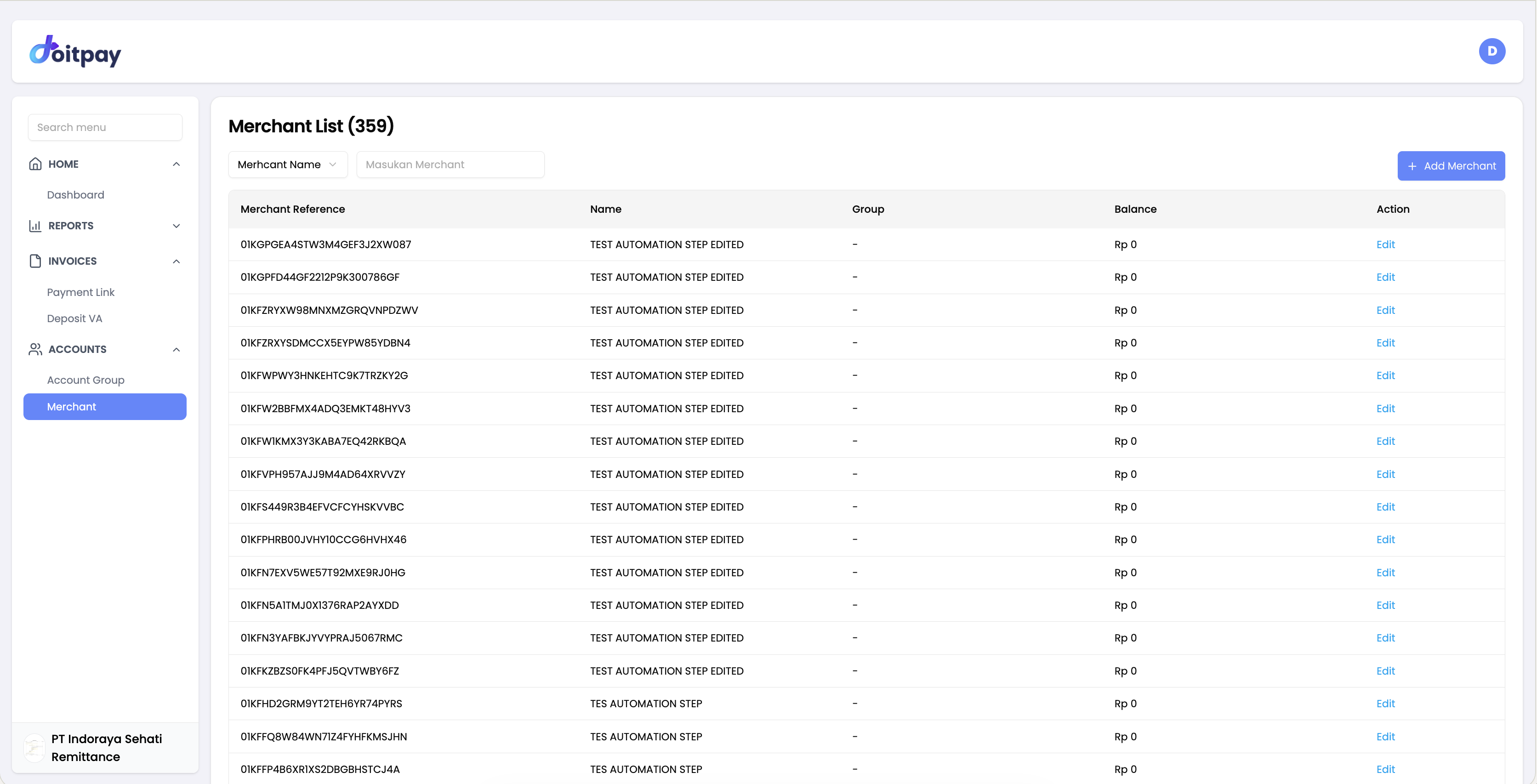
Navigate to ACCOUNTS > Merchant from the sidebar.
Understanding the Merchant List
| Column | Description |
|---|---|
| Merchant Reference | Unique identifier for the merchant |
| Name | Merchant's display name |
| Group | Which business group the merchant belongs to |
| Balance | Current balance for this specific merchant |
| Action | Available actions (view, edit, etc.) |
Searching for Merchants
Use the Search Merchant field (labeled "Masukan Merchant") to find specific merchants by name. This is useful when you have many merchants.
Adding a New Merchant
- Click the Add Merchant button
- Fill in the required information:
- Merchant Name: A descriptive name (e.g., "Store Jakarta Pusat")
- Business Group: Select which business this merchant belongs to
- Contact Details: Phone and email for this merchant
- Settlement Account: Bank account for settlements
- Submit the form
Note
New merchant requests may require approval. Contact your account manager if you need to add merchants urgently.
Viewing Merchant Details
Click on a merchant row or the Action button to:
- View complete merchant profile
- See merchant-specific transactions
- Check balance and settlement details
- View payment method configuration
Merchant Balance
Each merchant shows its current balance. This is useful for:
- Tracking earnings per location
- Verifying settlements by merchant
- Identifying top-performing merchants
Common Questions
Q: How many merchants can I have?
There is no standard limit. Your account can have many merchants based on your agreement with Doitpay.
Q: Can I move a merchant to a different business group?
Contact your account manager to reorganize merchant assignments.
Q: Why does a merchant have zero balance?
Either there are no pending funds (all settled) or the merchant has not processed transactions recently.
Q: How do I disable a merchant?
Contact your account manager to deactivate a merchant.
Q: Can different merchants have different payment methods?
Yes, payment methods can be configured per merchant. Contact your account manager to adjust settings.
Q: How do I view transactions for a specific merchant?
In the Transaction Reports, transactions are labeled with the Merchant Name. You can identify which merchant received each payment.
Best Practices
- Use clear naming conventions: Name merchants so they are easy to identify (e.g., include location or brand)
- Organize by business: Group related merchants under the appropriate business
- Monitor balances regularly: Check merchant balances to ensure settlements are processed correctly
- Keep information updated: Ensure contact details and settlement accounts are current