
Settlement Reports
Track when and how much of your collected payment funds are transferred from Doitpay to your registered bank account.
Settlement is the process of transferring your collected payment funds from Doitpay to your registered bank account. This page helps you track when and how much money has been or will be settled.
Why Settlement Matters
When customers pay you, the funds first go to your Doitpay account. Settlement moves those funds to your actual bank account so you can access them. Understanding your settlement schedule and tracking settlements helps you manage cash flow effectively.
Accessing Settlement Reports
Navigate to REPORTS > Settlement from the sidebar.
Report Views
The page offers two tabs at the top:
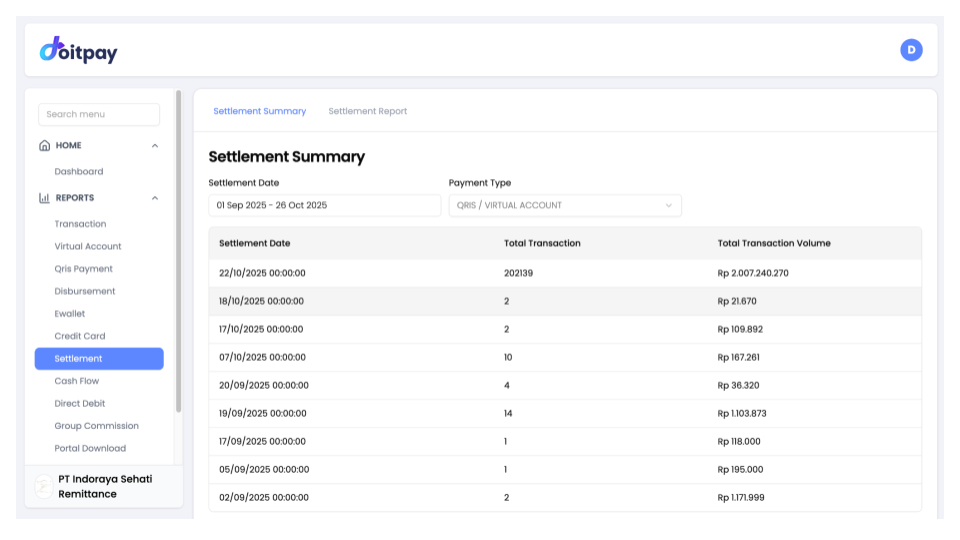
Settlement Summary
A high-level view showing daily settlement totals. Use this for quick reconciliation with your bank statements.
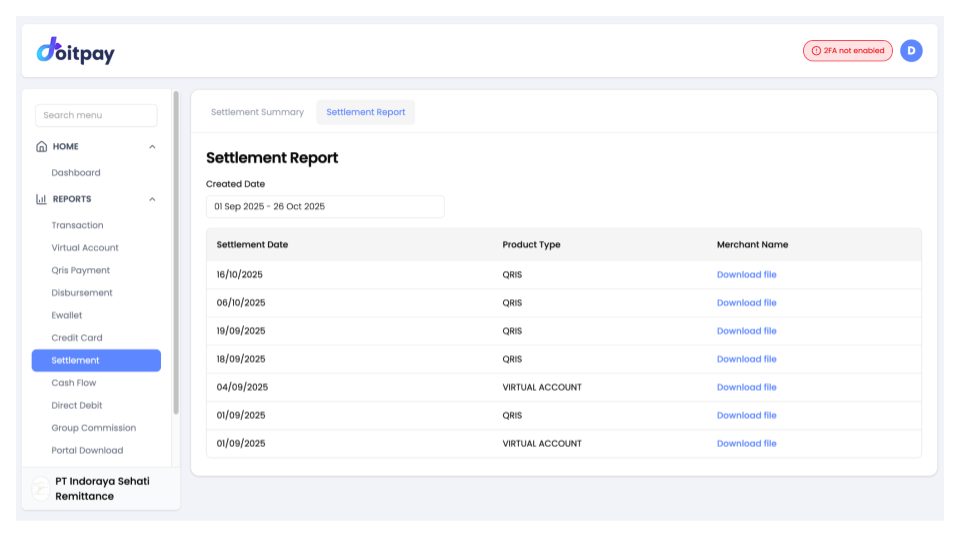
Settlement Report
Detailed breakdown of each settlement by product type, with downloadable files. Use this for detailed accounting and individual settlement verification.
Click the respective tab to switch between views.
Filtering Settlements
By Date Range
- Click the date range selector (e.g., "01 Sep 2025 - 26 Oct 2025")
- Choose your start and end dates
- The report updates to show settlements in that period
By Payment Type (Summary only)
Use the Payment Type dropdown (e.g., "QRIS / VIRTUAL ACCOUNT") to filter settlements by specific payment methods. This helps when reconciling by channel.
Settlement Summary Table
| Column | Description |
|---|---|
| Settlement Date | Date funds were/will be transferred to your bank |
| Total Transaction | Number of transactions included in that settlement |
| Total Transaction Volume | Total Rupiah amount being settled |
Settlement Report Table
| Column | Description |
|---|---|
| Settlement Date | Date of the settlement |
| Product Type | Payment channel (QRIS, VIRTUAL ACCOUNT, etc.) |
| Merchant Name | Download link to get the detailed settlement file |
Tip
In the Settlement Report view, click Download file next to any row to get a detailed breakdown of that specific settlement.
Understanding Your Settlement Schedule
Settlements follow a schedule agreed with Doitpay:
| Schedule | Meaning |
|---|---|
| T+0 | Same day settlement |
| T+1 | Next business day |
| T+2 | Two business days |
| Weekly | Once per week |
Note
Your specific settlement schedule is in your agreement with Doitpay. Contact your account manager if you are unsure.
Reconciling Settlements
To match settlements with your bank statement:
- Go to the Settlement Summary tab
- Select the date range matching your bank statement
- Note the Total Transaction Volume for each settlement date
- Compare with deposits in your bank account
- The amounts should match (allowing for bank processing time)
For detailed verification:
- Switch to the Settlement Report tab
- Download the settlement file for the date in question
- Review individual transactions in the downloaded file
Tip
Settlements usually appear in your bank account on the Settlement Date, but may take until the next business day depending on your bank.
Common Questions
Q: When will I receive my funds?
Check the Settlement Date column. Funds are transferred on that date according to your settlement schedule.
Q: Why is my settlement amount different from my transaction total?
Settlements show the net amount after fees. Your transaction totals show gross amounts before fees.
Q: A settlement is missing from my bank account. What should I do?
- Verify the Settlement Date has passed
- Check if the date falls on a weekend or holiday (banks may process next business day)
- Confirm your registered bank account is correct
- Contact support with the settlement date and amount
Q: Can I change my settlement schedule?
Settlement schedules are set in your agreement. Contact your account manager to discuss changes.
Q: Can I request an early settlement?
Contact your account manager to discuss early settlement options if available.
Q: Why are some payment channels settled separately?
Different payment channels may have different settlement processes. This is normal and helps with reconciliation. You can see the breakdown by Product Type in the Settlement Report tab.
Best Practices
- Reconcile regularly: Check settlements against your bank at least weekly
- Note the schedule: Know your settlement schedule so you can predict cash flow
- Download reports: Use the Download file links to keep detailed records
- Monitor discrepancies: Report any mismatches to support promptly